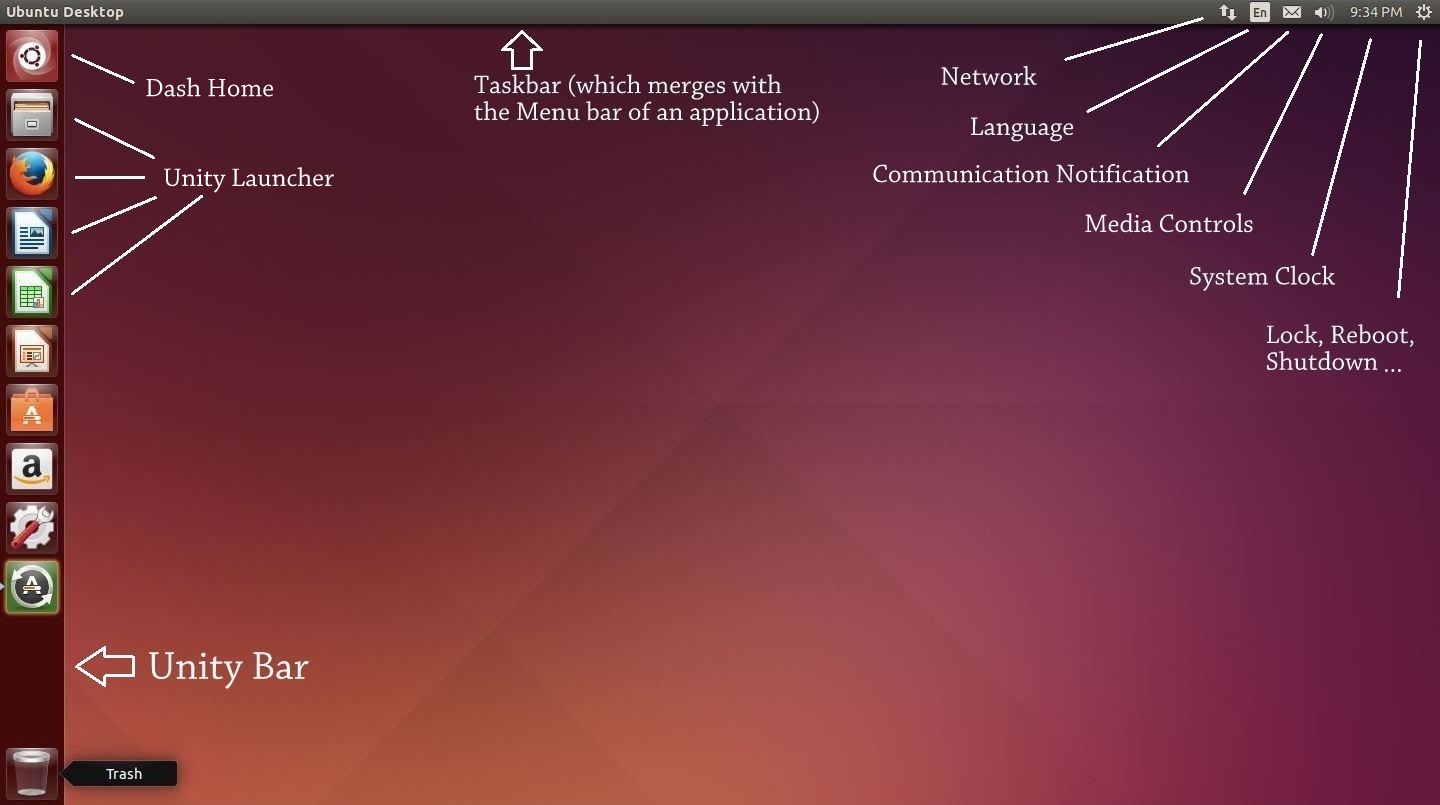
So we have installed Ubuntu in a Virtual Environment and know that some (or a lot) of the things in Ubuntu differs from windows, like filesystem and how removable drive works. In this article I will be starting from a fresh install of Ubuntu and try to get familiar with the User Interface. In the upcoming post I will proceed to set it up with softwares and settings. I will literally be writing this article “while” I am using my PC, so this is not just a guide but more of a walk-through. Hence, please excuse my remarks which I sometimes make to emphasize my excitement (or disappointment) when I discover something. Here’s what a freshly booted Ubuntu looks like:
Freshly booted Ubuntu
We can notice a few things now:
The taskbar is above the screen. It have the text “Ubuntu Desktop” written in right side of the taskbar. It also includes some icons on the top right corner including a clock and an icon on extreme right which looks like “Settings” icon.
Unity bar which runs across the left side of the desktop, containing some icons of softwares like Firefox, Libre Office and System Settings. You will also notice an icon of Recycle bin down below.
Rest of the screen is just plain desktop with no other stuff than default Orange wallpaper.
Now that we know about these three things, we would like to know how does these differ in functionality. Nice! Now we are getting into the good stuff … Continue reading Ubuntu: The Stage is Set→
I use to watch a few Bollywood movies. And then I saw Ugly from Anurag Kashyap. What followed next were a lot of surprises and regrets.
I was surprised since I never expected such a movie to be coming out from today’s Indian cinemas, and regret since I have seen very few movies of Kashyap’s movie before and none from the recent times!
Quoting from IMDb,
Ugly is a terrible tale of corruption, indifference, and systemic violence which starts when 10 year old daughter of an aspiring actor disappears.
Yes, the film’s as dark as it sounds. Just eleven minutes into the film the daughter disappears. What happens next is a reflection of the sheer terror of our own society. The film takes you on a spin ride that feels so real that you start to think you are a part of the film. The actors did such a phenomenal job that it surmounts the very definition of what acting means. You feel as if the story is being broadcast Live on your screen.
The dialogues of the Ugly doesn’t feel scripted out. In fact I would not be surprised if Kashyap didn’t give the actors any script at all. At some places it felt as if maybe he just explained the plot to the actors and let them speak their own dialogues.
Even though the theme of the film is dark it also have a lots of Humour, which gives the film a much needed comic relief. There are a lot of moments in the film which makes you chuckle so hard that you almost forget the dark premise. Special mention have to be given to the policeman in the film, Jadhav played by Girish Kulkarni. When he sings the Item number, “Tu mujhe nichor le”, I just burst out laughing.
And yes, the film does go in length to feature a fictional item number complete with a scene from the dance itself!
Ugly, doesn’t shy away from scenes which might make the viewers uneasy and dares to be different and while if it’s Kashyap’s signature is yet to be judged. Hence my next set of movies will be what I heard are best from Anurag Kashyap’s contribution to Hindi cinema, Gangs of Wasseypur, Bombay Talkies and That Girl in Yellow Boots.
While the title of the movie is “Ugly” the film is a beautifully directed by Kashyap. There maybe other interpretations of the title of the film, but I think it refers to the ugly side of humanity which always resides within us, lurking and trying to find any opportunity to show it’s ugly face, no matter how much we try to ignore it.
In a nutshell, Ugly is a break from the normal rom-com films that Bollywood makes today, it dares to do what most other directors gets apprehended of.
It’s a dark movie at its finest.
Bollywood is filled with so much crap today that films like Ugly gets lost amidst the noise and fails to get the recognition it deserves among masses. Needless to say, we need more of these. Anurag just made a new fan following here.
End note: If anyone tried to spot cameo of Alia Bhatt in Ugly, she’s at around 42:31 but you may miss her in the blink of the eyes!
In my previous post I said I would be looking an alternative in Linux for everything I do in Windows. Here’s an initial list of the applications that I am finding an alternative to. I would be updating this post fairly regularly, adding more things to the list and their alternatives, until I am confident that I can plan to make Ubuntu as my primary OS.
Softwares
Type
Alternative in Linux
Which have Nix versions
Firefox
Browser
Firefox
F.lux
Screen Dimming app
F.lux
Dropbox
File sharing
Dropbox
Telegram
Chat application
Telegram
VLC Player
Video Player
VLC
Steam
Gaming software
Steam
Which have no Nix Versions
Garena
Gaming LAN client
NA
Raptr
Gaming Client
NA
Which have good alternatives
uTorrent
Bit torrent application
Transmission
Everything
Real time file search
Locate command in Terminal
Nettalk
IRC Client
XChat
Microsoft Office Picture Manager
Picture editor
Shotwell or GIMP
Wordweb
Dictionary
GoldenDict
Netmeter
Record of consumed bandwidth
Conky comes closest
IDM
Download manager
uGet
Google Talk
Google chat application
EmpathyIM
Winamp
Music Player
Rhythmbox or Banshee
MS Office
Office Suite
LibreOffice or Wine
Where no alternative is needed
BullZip
PDF Printer
Not Needed since ubuntu have built-in PDF Printer
PuTTY
SSH and Telnet Client
ssh and telnet command on Terminal
FileZilla
FTP Client
ftp command in Terminal
Code::Blocks
C, C++ Programming IDE
Use GCC from Terminal or Emacs
To Be Decided
MS-Paint
Pixel level bitmap picture editor
Apart from the applications, there are other things which a particular Windows user gets adapt to:
Custom Keyboard Shortcuts: As per current info it’s possible to set custom Keyboard Shortcuts in Nix easily.
Ability to create apps shortcuts:
Background apps and a System Tray:
Window Switching: From what I know now, switching in Nix is cooler and more functional than windows. Shortcut to use it is “Home key” + “W”.
Autostart Apps: Ability to let the apps start automatically when OS boots by putting the app in something called as StartUp folder.
When the softwares and UX is sorted out next thing which comes is understanding some lingo of Nix which might be totally unfamiliar to newbies in Linux:
Filesystem: Nix don’t have the concept of Drives like C, D or E. Rather everything in Nix starts from the root. “\” is root folder. Hence path to your home folder can be, “\home\vyom” which means “vyom folder inside home folder of root folder”.
Mounting of drives: Any DVD or removable USB drive you insert is mounted to some folder inside root folder. <insert example>.
Installing Apps: Nix don’t have .EXE files rather it have various ways to install apps.
apt-get install <softwarename>
TAR Packages
Expect revision to this post to reflect new information soon.
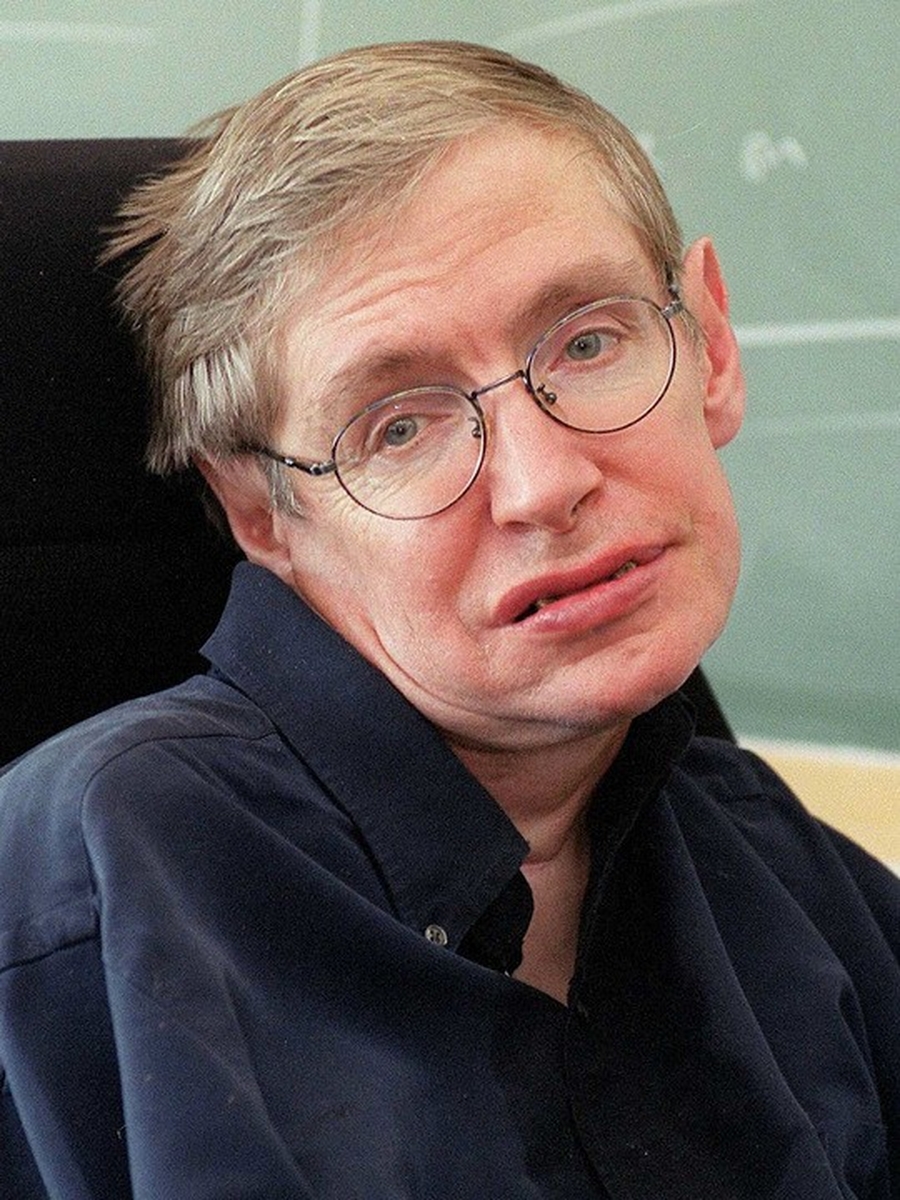
A lot of time have passed since I last wrote a good movie review and after I watched Theory of Everything, I had this urge to write that I couldn’t contain. The Theory of Everything is a biographical movie which tells the story about the romantic side of Stephen Hawking and his relationship with his first wife, mostly unknown to the general public including me. Movies like this (based on some living legendary person) always feels a little diplomatic (like The Social Network) but are still, for the lack of a better word, interesting and also motivational.
In my teenage years I use to love all those documentaries on Discovery about theories with mind bending possibilities. It always use to take me to amazing realm of a world that remains invisible to the naked eye. Hence it was natural that I was expecting to be dazzled yet again and experience that once again on big screen. But what I saw actually was the story of him before he become a successful physicist. The movie is a story not about his professional work rather it’s solely focused on the personal life of Stephen Hawking. We got to know about how incredibly nice Jane (his first wife) was with Stephen. She was an incredible woman to sacrifice so much of her life for the love she had for Stephen. Her devotion towards Hawking for so many years was rather unparalleled.
I was expecting a cameo of real Stephen Hawking in the movie, but Eddie Redmayne, the actor who played Stephen did such an incredible job that the cameo wasn’t really missed. I haven’t watched other works of Redmayne but the portrayal of him as Hawking really transpired my imagination and felt like it was the real Hawking himself on the screen. The wife of Hawking was acted by Felicity Jones who was also good. Involvement of David Thewlis was a little distracting at first since I was used to see him as Lupin in Harry Potter movies. Guess what, he is a professor in this movie too and hence I didn’t find it out of character.
Anyone who have read the Marriages subsection on Wikipedia had already read the whole plot of this movie, since the story is consistent with what was shown on screen.
In a nutshell, The Theory of Everything is a Romantic and emotional film that grips you till the end, except when in second half you realize it’s not just a romantic film, but a Biography first. Even though having interest in Cosmology and Physics, I enjoyed the film very much. I got to know the personal side of his personality, about the man I have always adored as a cosmologist. If I could reverse the time, I would still watch this film and probably love it again.
Now, here are some Fun facts which I came to know after some research (no spoilers):
Stephen Hawking is English, not American, as I discovered from this movie! What!?!
At the end credits of the movie, the name of the casts which are credited are in the reverse order of appearance since “reversing the time” is the theme of the movie. So if you are watching this movie you may observe it first hand.
Stephen Hawking owns the copyright to the “electronic voice” that he speaks through the computer!
Lastly, even though real Stephen Hawking doesn’t have a cameo in the film, he does lends his voice in the end of the movie reciting one of his most famous quotes. And while the quote ended on screen I could hear claps from some people in the audience. I gladly joined them with few claps myself. The quote was so overwhelming and profound that I think I felt the impact it created on my perception towards life. I would end this post with the same quote,
There should be no boundaries to human endeavor. We are all different. However bad life may seem, there is always something you can do, and succeed at. While there’s life, there is hope.
– Stephen Hawking
I had a long awaited dream of migrating from Windows to Linux. I was exposed to Windows since more than a decade and made aware of Linux a lot later. But when I did, sheer glimpse of Linux use to make me feel all geeky inside, but I never really gave Linux a chance. I was too engrossed by the ease of use of Windows and just-reinstall-windows as the default option to get out of any misery I face in Windows. Till the time I get to know the real power of Linux in the form of Ubuntu and the general open source nature of it it was very late. I had become so dependent on Windows for my daily tasks that I started to avoid Nix for all the reasons.
Now I have finally decided to give Linux (in form of Ubuntu) a fair trial. But instead of installing it on a dedicated drive I decided to virtualize it so that I can use both Windows and Linux till the time I become proficient in Ubuntu.
Installing Ubuntu on VirtualBox would have been a breeze had I followed this guide (created by my friend Aaruni, which I had to recover from archive. Or this for an updated article). But alas I came across his walk through a bit late and also came across this problem of not getting to install 64 bit Ubuntu on VirtualBox. But thanks to the suggestion provided here, I managed to solve it without spending hours. The summary of the problem was that I had to disable “Virtualization” from “Turn Windows Features On or Off” since it conflicts with the “Enable Virtualization Tech” turned ON in BIOS.
So now, here I am publishing this post from within Ubuntu 14.04 and exploring the world of Linux without completely abandoning my comfort zone of Windows. But I Intend to make Ubuntu my primary OS in a few months until I can learn every nooks and cranny of this seemingly giant but not completely unknown territory that is Ubuntu.
I also intend to document my journey of using Ubuntu from a perspective of “oh-I-am-a-Windows-guy-and-I-want-to-work-on-Nix-but-not-sure-of-how-to-do-certain-things-that-I-use-to-do-in-Windows!” kind of guy. Hence I would be looking for “every” alternative of things in Ubuntu that I am so use-to in Windows from tools to shortcuts to the whole User Experience. It will be an exciting journey and something to look forward to but in the end worth doing.
It was about one year that this site was hosted on a VPS server of Leaseweb. They provided a good set of specs but had some amount of unreliability when it came to providing 24×7 up-time. Also it once had a service outage that resulted in the loss of our data. Thanks to offline backups and Google cache I was able to restore all my posts. So it was high time before we moved onto something more trustworthy. It was then when I came to know about Digital Ocean, an SSD only VPS hosting provider. After a lot of geeky research I realized how quickly they grew their scope to provide a quality platform for VPS.
What follows next in this article is the story of how I migrated to DigitalOcean with help from my friends. Be warned that this article is fairly technical and can also serve to anyone who wants to migrate to DigitalOcean. I wholeheartedly thank Aaruni for his help on setting up the server, without his help it could have taken me days to do the same.
1. New Server on DigitalOcean (DO) VPS
There are numerous VPS providers but none at the feature to price ratio which DO provides. Hence me and my online friends decided to go for the most basic plan of $5 per month, which provided us with following features:
512MB Memory
1 Core Processor
20 GB SSD Disk Space
1TB Transfer Bandwidth
This configuration is modest to run a Unreal Tournament (UrT) gaming server and to host numerous small websites which were our requirements. Plus its easy to upscale so starting from the smallest option seemed to be a wise decision. Continue reading I migrated to Digital Ocean→
Year 2014 was one of the busiest year so far. And while my friends are busy posting what made their past year so happening on Facebook I thought I shall not rely on some artificial algorithm to tell my story of the year 2014. Hence what follows next are some of my real life experiences with lots of personal touch.
2014 proved to be a very important year for personal growth, learning and getting new experiences. I worked on many projects at job, revived old technologies and learned new ones. 2014 was a sad year for a lot of people but it also proved historical one for Indian political system.
During the first quarter of 2014, I caught myself in a situation where two of my immediate seniors at job left almost simultaneously leaving me in charge of a whole new set of responsibilities. That was a sudden change in the pace of my life but nothing which I couldn’t handle if I followed what my peers had taught me. Continue reading Year 2014 at a Glance→
Every once in a while a piece of technology sets it’s foot from inception to reality, that is perceived ahead of its time. It features tech which makes people awe in wonder. People dream of owning such a piece of technology that catapults them into the future.
One such device was my Optimus One P500 (O1 in short), an Android device manufactured by LG which featured specs which were uncommon at its price point. Granted it was not supposed to “take you to the future”, but it was as close as you get if you were under a budget. The device had 512 MB of Random Access Memory, which none of the branded manufactures at the time managed to pull it of in a sub 10k phone. Quickly it became the most loved gadget by amass and also among the developers at XDA, a place where developers collaborated for the greater good.
O1 came with Froyo (Android ver 2.2) when it was launched in October 2010. With the curves and specs it had it looked a neat little Android gadget to admire. It was after 9 months of the launch that I came to know about O1, took me one month time to research, write a blog about it and to finalize that my next smartphone can only be “the One”. After that it still took me 2 months to save money from teaching programming classes to school students, apart from doing 9-5 regular job. But it was a good phone and a gadget worth the hard work to own.
I remember when the delivery boy from “LetsBuy.com” came to my home and handed me over the phone while I was fiddling with my wallet to make it lighter. My dad was surprised by the way I handed hard cash to some stranger who just arrived at the doorstep. That was my first experience in online shopping but I trusted it. And it payed off well over the years. Continue reading Saying Adios to my first Android→
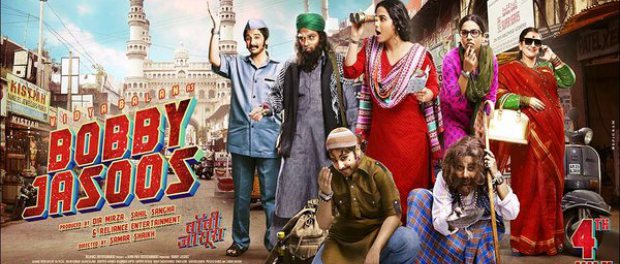
While my choice of genre doesn’t really allow me to digest modern popcorn blockbuster Bollywood movies, I often tend to enjoy them occasionally if served with a good story and execution. I will have to say that Bobby Jasoos was not one of them.
Bobby Jasoos seems to be a half baked, self pretentious attempt in directing by Samar Shaikh and endorsed by Diya Mirza as a Producer, whose skills could have been better utilized as an actress to save this movie a little.
The story of Bobby Jasoos is about a 30 year old Muslim girl named Bobby, residing in the heart of Hyderabad city near the iconic Charminar. While she keeps herself involved in investigating cases in night and trying to get a proper detective job in daytime. She is having a rough time in securing clients as a detective, but luck takes a big turn as she receives an assignment that pushes her to her limits. Rest of the film is a riot as she tries to struggle her career as a detective and manage her family emotionally who doesn’t seem to be in favor of what Bobby does.
While the film seems to have so much potential what makes it fail is the treatment. The film starts of in a humorous tone and actually seems like to begin with the right foot. But as it picks up pace we are introduced some of the people that seems like a cliche examples of typical characters from all of the Bollywood movies I detest watching. Slowly the viewer is faced with slapstick humor, family drama and been-there-done-that events that feels like Deja Vu in the course of a family drama movie.
Songs don’t help either. Neither of the songs in the film leaves an impression on the viewers mind, rather give them a chance to take a break and catch up on sleep while they are at it. There is one particular song in the movie which I won’t specify to stay away from spoilers, and which I personally think was totally uncalled for in the situation. Perhaps the pacing or editing could have been a lot better, so as to give the movie a coherent flow.
In this movie Vidya Balan in the role of Bobby gets to change in a lot of getup (around 12) but most of them doesn’t help the story in much ways. It looks as if she was made to change just for the sake of humor. While the film can be considered short at just 121 minutes, it feels somewhat dragged occasionally, and fails to let viewers invest their emotions into any of the characters except of the lead character.
That being said, the film does have its moments but those are just a few. I would also say it was a daring attempt to try to execute a movie with only a female lead, who for the most part remains out of glamor, and where she is also shown to break free from many of the stereotypical role a women is portrayed in Indian movies. I would also have to admire Vidya Balan for her acting skills as she was very convincing in all of those getup she did onscreen. I would not blame the execution of the movie on her since the onus of the complete movie lied on her shoulders alone. And she did her role perfectly.
It would be fair to say that while the first half of Bobby Jasoos, raises viewers interest a little, second half helps it raise even further, but the final twist fails to live up to the expectation. One more movie “Queen” was also released recently where the story was about a female lead who is shown to break free from various stereotypical roles, but it would be unfair to compare both of them, because while Queen was set up in vibrant and colorful foreign cities like Paris and Amsterdam and was more closer to today’s generation, Bobby Jasoos relates more to India and typical Indian family drama, and was filmed totally in the streets of semi urban parts of Hyderabad which gave the movie a special flavor of India, more closer to most of the people of the country.
Combined with all other things I would rate the film a 6 out of 10. Extra 1 to give Bollywood a break from the male dominant masala movie and an attempt to create India’s own Sherlock Holmes.
Recently I came about a thread on a tech forum I regularly visit, which asked a question about how many apps one uses in a day. Surely there are a lot of apps. Thousands and thousands of them in the apps market. I even made a list about the must have apps. But does one really use a lot of apps on a regular day? I guess, apps like Launcher, Dialer, Messaging, People (contacts) and Gallery (includes camera app) need not even be mentioned. Since those are by default used by everyone. So what other apps…? I tried to write a story based on actual events to see where I judge myself in this regard. Results were pretty revealing!
I can’t wake up in the morning unless the Alarm plays a random song from my list of my favourite songs. So that’s one. Then I need to watch what time it is when I *finally* wake up. Clock and weather widget it is. That counts as an app too.
While traveling to office I would listen to my songs on TTPod and chat with friends on WhatsApp and Telegram. I would also surf some forum on Tapatalk since it’s just unavoidable.
Now I am in office. I pretend to work for sometime. Then I would need some break and I would goto breakout area where I see one of my colleague have this amazing trailer of a latest movie, “Edge of Tomorrow”. I just need to watch this and have it on my phone too. I would use ShareIt app to transfer the video to my phone in seconds (it uses wireless tethering to do that and is a great app btw). I would view the video using MXPlayer on my phone. Wow the trailer is amazing and I need to make a post about it on my FB Page. So I use Pages manager to do that. I don’t use Twitter or I could have used Hootsuite to update on FB and Twitter together.
Now its lunch time. And I would have forgotten to check whether I published that article on my website which I was drafting the previous night. I would use WordPress app to do final touches and “publish” the article. I could have also uploaded any media on the web server using ConnectBot if its needed.
I will now view how my recent blog looks like on any browser like Opera or Chrome. I can also use Chrome to read articles which arrives via RSS feed like Flipboard or Appy Geek when I am on the loose after lunch.
Oh dear, its month end! Did my salary came? I would quicky check it from my bank’s app. Be it ICICI or Citibank. Even government bank like Canara Bank have an app now. I would leave for home early that day since I would remember I had some shopping to do. I would refer the list I made using ColorNote or a task application like Astrid to remind me of the list of things my sister wanted me to buy for her too.
I am on the Metro platform now and want to goto a market very far. An app of DMRC Metro would guide me before I get lost. (Yea, asking from people would help too, but I have been taught not to talk to strangers, unless it’s urgent).
While I am traveling to the market I would play some games on my mobile. Anything like Asphalt 8 or a quick race of Subway Surfer could help me avoid the strangers I was talking about earlier. Oh wait.. did I see someone playing this good looking puzzle game I haven’t seen earlier? Lets just download it through Play store and get started to shatter his record.
While shopping I can use my Barcode application to quickly scan and get to know the exact date of manufacture so that I don’t pickup old stuff. (Mom would have loved a portable Barcode scanner when she shops. But, I could be a barcode scanner for her anytime now.) But I consider myself a smart shopper, ain’t I am? So while shopping I would compare the prices of different stuff available online. Flipkart app it is.
Well, its about time now. Time to return home. I don’t really know I have the energy to catch another metro in the rush hour of evening. Lets just call a cab using an app I still have to find on Google play (cause I know there is one) and reach to my home keeping an eye on the driver, meter and Google maps. I don’t want him to drive me home using the longest route, do I?
Anyway I reached home. Now which app? Well, at home I would keep my phone in one corner. I won’t use any other app now since I don’t need them to talk with family. Enough apps for today. Maybe I would need to use more apps like Dropbox when I need to share some documents with my friend tomorrow, or Endomondo, when I need to track how much calorie I burn after a quick jog in one hypothetical but possible morning, or AndChat to chat on IRC with online friends. For now… its the end of the day and I need some rest. Screen locked.