All posts by vyom

The User Experience of using Ubuntu

In previous articles we installed Ubuntu, learned how to use Gnome shell on Ubuntu and customize it as per needs. In this article I would be dealing on some more points which makes it easier to understand the aspects of Ubuntu for those who are still deeply wrapped up in the world of Windows. Then we will learn how you can use keyboard shortcuts to improve the User Experience of using Ubuntu. In the end we will see how you can use built in ways to help yourself if you ever needed to learn more about Ubuntu and Terminal commands.

Philosophy of Linux over Windows

There are a few structural changes one notices when they migrate to Linux based OS like Ubuntu as compared to Windows. Following is a list that explains some of them:

1. Disk System

In Windows each partition of the HDD is referred as Disk1, Disk2 etc. While in Ubuntu it is termed as sda1, sda2. Here sda stands for one physical hard disk. And sda1 stands for Storage Device “A” partition 1 on a single physical HDD.

2. File System Type:

Filesystem is a way for the OS to keep the data on the HDD and a way to access it. Windows user would be familiar with NTFS and FAT32 but on Ubuntu, EXT3 or EXT4 is used primarily while EXT2 and XFS are also common.

3. Drive Naming Convention:

In  Windows people are too familiar with drives named on alphabet like C, D, E and F. It’s the C: drive which is the root drive and where OS is installed. Ubuntu is radically different  where the naming convention is considered.
In Ubuntu, root is a single forward slash. That is, “/“. So suppose I create a directory (another term for “folders”) called home in the root folder. The path for that would be /home.
Due to this convention, the way removable drives are handled is also different in Linux. A CD you insert with label projectone in the CD drive will be “mounted” and can be accessed from say, /media/username/projectone.
Lastly, in Linux, file and folder names are case sensitive. So, /home/user is different from /home/User and /home/USER.

A typical Directory Structure in Linux
A typical Directory Structure in Linux. Image Courtesy: edx.org

Continue reading The User Experience of using Ubuntu

Lotus Temple

Lotus Temple, also called Bahá’í House of Worship is a construction which is famous for its architectural design which is in the shape of a Lotus flower. It’s located near Nehru Place, in South Delhi, which is widely considered as major information technology hub of South Asia.
I have visited Lotus Temple many times before, but this I was able to capture this 360 degree sphere, under cloudy sky. Caution: A few legs would be missing in the panorama. As it turns out I am still a newbie when taking a Google Sphere is considered.

Click here to open this in Full Screen.

Predestination (Spoilers)

I was able to watch Predestination few days ago and the movie was every bit I was expecting. I started to draft this blog, but it took me a while to complete.
Maybe the cause of my fixation with Time Travel and having been read a lot about Time Paradoxes, I understood the “main plot” in one shot. Heck, I would even say that the movie felt a little slow even if it was clocked around 90 min, for what was it worth. But the reason why I put “main plot” in quotes is that while the plot is crystal clear in my mind, to be able to write this post, I watched it again just so to note more details that I may have missed the first time.
The least you know about Predestination more you will enjoy it. Hence this article isn’t actually a review but an analysis of the movie’s plot. Needless to say, if you are into Time Travel movies, it’s best to watch the movie first and then come back here in case you need to know what actually happened in the movie.

Spoilers from here:
Predestination is a movie that will be a cult classic for those who want to study about “Predestination paradox”, “Novikov self-consistency principle” and “Bootstrap paradox”.
The events in the movie have no origin, no middle and no end in terms of causality. But instead is filled with loops that have to be followed in the order it is to be performed. A girl is dropped to an orphanage, raised to become a women, had a sex change into a man, time travels into the past, falls in love with his female version, gives birth to a baby girl, and then turns into someone who becomes totally unrecognisable, who then takes the baby girl back to the orphanage, there by closing one of the loops the movie had. But the movie have so many such loops that it easily gets viewers confused.
I am wondering about the prowess of writers who manages to write such a plot. If we write the movie chronologically of how she grew up, the involvement of her future self makes it complex. If we try to write about it in chronologically of Time it will be more challenging since causality will be very difficult to explain. Hence for me to be able to decipher all the loops I will need some terminology to setup.
A = Jane – The baby girl.
B = Jane – The women
C = John – After sex change, Jane becomes a man.
D = Ethan – When John’s face is burned he becomes Ethan.
E = Old Ethan – When Ethan becomes the Fizzle bomber.
R = Robertson, the person representing SpaceCorp
Keeping in mind above terminologies here’s what happened in the movie, plot wise:
1. The film starts in 2-Mar-1970, with C. When he’s at the location of the bomb trying to defuse it. But E tries to shoot C. (6 shots are fired from both sides in total). C while defusing the bomb burns gets his face burnt in the process. D comes into picture here and helps C escape the scene by sliding the time machine to him. C escapes to 0900, 21-Feb-1992.
2. In the next shot we see D (who have just transformed from C) in the medical room. (BTW, here he says, “I doubt my own mother will recognize me”, which is foreshadowing the event when D meets A and B :D)
3. D starts with a job at the bar as a bartender (in unknown time). This is where C arrives in the bar and D was waiting for him. It is also here where C tells D his life till now. (BTW, at this point D tells him the joke about, “What comes first, the chicken or the egg?”, again foreshadowing the story).
C narrates D his story. And following events occur:
4. D drops A to the doorstep of an orphanage (0945, 13-Sep-1945).
5. A grows up into a girl. And she is confused about her gender since she knows there is something wrong about her. We will know soon what that is. She also wanted that when she would have a child, the child would have both a father and a mother, and so she vowed to be a virgin.
6. A grows up to B and is invited by R to join some kind of space program. (which we later comes to know that is actually not a space program but a way to recruit people who can travel in time).
7. But here B was rejected from the program since R found out that she had a two full set of organs: Male and Female. (We would know why later).
8. B then stumbles with C and since C is just a male version of B, C is captivated by her own beauty.
9. B gets pregnant from C.
10. C left B letting her sit on a park bench. (24-Jun-1963)
11. R shows up at B’s residence but founds out that she was pregnant, and again rejects B for SpaceCorp.
12. B comes to know about her weird body structure.
13. B gave birth to A, but someone steals the baby. (Later we come to know it was D).
14. And now, after some 3 major operations and many months later, B changes to C.
15. C now have a hatred for the one who ruined her life by making her pregnant.
16. C tried again to get enlist into SpaceCorp, but he was unsuccessfully.
17. C came to New York and started working as a chef but then she came up with the idea to publish articles under the pen name “The Unmarried Mother”. Reason that C was first a women, made her able to write so good with “women’s angle”.
18. D now opens up and says C that he can get him to meet the man who ruined her life, and “guarantee’s that he would get away with it”. (It is here that he asks “what if I am Fizzle Bomber, then proceeds to ask C if he’s a Fizzle Bomber, foreshadowing that Both are infact the Fizzle Bomber).
19. D time travels with C and brings him to 1705, 3-Apr-1963, gives him money and a gun and asks him to change clothes.
20. D also tells C to make the conversation to this time period, to its absolute minimum.
21. C then stumbles with B and realizes that it was himself who she met with in 1963. [Connected to point 8]
22. D goes to 1970 (0845, 2-Mar-1970), to stop E, the Fizzle Bomber. [Connected to point 1]
23. C is also there trying to defuse the bomb which E planted and while he tries to do it, he burns his face, (who then converts to D). (Exactly 6 shots are fired here, just like before). [Connected to point 1]
24. D travels to 2-Mar-1964, the time when B gives birth to A. [Connected to point 13]
25. D steals A, the baby, and take her to start of the story (0945, 13-Sep-1945) and drops A to the doorstep of an orphanage. [Connected to point 4]
26. D travels to 24-Jun-1963 when C is talking with B sitting on a park’s bench. D tells C that he would have to leave B. [Connected to point 10]
27. D takes him to 12-Aug-1985 and leaves him with the Tape Recorder where he have recorded instructions throughout his journey which would help C perform his work.
28. D would not retire and he wants to do that by going to 1975. R tells D that after he reaches to 1975, his field kit (time machine) would get decommission. D then travels to 1200, 7-Jan-1975 (date near to the blast by Fizzle Bomber) in preparation of his retirement.
29. The Time machine though, doesn’t get decommission depicting that he have a fully working time machine at it’s disposable.
30. D researches a lot on locating E, the Fizzle bomber and traces him in a Laundromat.
31. D recognizes E that he is “himself” but now aged.
32. E starts the conversation by saying “he missed D”.
33. E then tells D that he is not actually a Fizzle Bomber, but he have actually saved many lives using the Time Machine.
34. But all the persuasion proves futile, and D kills E.
35. The movie ends with a montage of all the phases of the protagonist’s life from, A -> B -> C -> D -> E.
36. In the very last shot before credits roll, D says “he misses C” like he mentioned before (or after) when he becomes E and meets D in Laundromat. [Connected to point 32]

Timeline Chronology:

Finally, taking into account all that that happened in the movie, here’s the actual timeline chronology:

13-Sep-1945 - Assumed birth-date of Jane (as per city records).
03-Apr-1963 - Ethan brings John to past in order for him to kill "the person who ruined his life")
24-Jun-1963 - When John leaves Jane on the park bench.
02-Mar-1964 - Real birth-date of Jane (as per the person's chronology).
02-Mar-1970 - Old Ethan plants bomb, John tries to defuse the bomb and Ethan tries to kill Old Ethan.
07-Jan-1975 - The date Ethan chooses to get retire
xx-Mar-1975 - The Main Bomb that the Fizzle Bomber manages to blast in New York.
xx-xxx-1981 - Invention of the Time Machine
12-Aug-1985 - Ethan have brought John to the 'facility' where he would get trained for 'the job'.
21-Feb-1992 - John traveled from 1970 after he gets his face burnt and becomes Ethan.

Predestination is an incredible and an excellent movie. It have got breathtaking attention to details and amazing execution of the paradoxes.

Making Ubuntu Personalized with GNOME

Until now we got familiar with Ubuntu and know how to install updates and softwares, as well as know how to use a few commands using Terminal. And now that we know what is Unity and the Unity bar, it’s time to dump it! Seriously, there are cooler alternatives out there. One such alternative is GNOME. GNOME was native part of Ubuntu until a few versions ago. But Canonical switched it for Unity later. And while Unity may provide a very good shell I don’t think it’s on par with modern era.
In this guide I will install GNOME  and write about how to customize it with extensions.

GNOME:

GNOME shell provides a fully customized UI on top of Ubuntu. Consider a shell akin to a completely new theme in Windows, except, shell is much more than just a theme. It actually is a complete Desktop Environment (DE) and contains completely different and sometimes a unique set of features which other shell lacks.
Unlike Windows, you can  choose to use any DE right before you login from the login page. So while one user might be using Unity, you on the same Ubuntu can use GNOME. I should warn though that GNOME is a little heavy on resources than Unity, but it’s beautiful and that there are some sacrifices which have to be made for “elegance”. Without wasting more time lets just install GNOME and see it in action.
To install GNOME run following command on Terminal (again Ctrl + Shift + T) while entering password when asked:

sudo apt-get install gnome

This will install a bunch of packages (around 500 MBs) which are included in GNOME by default. Continue reading Making Ubuntu Personalized with GNOME

Ubuntu: Updating and Setting up Softwares

In my last article I wrote about my first impressions of freshly installed Ubuntu 14.04 and shared what I knew about Unity interface which Ubuntu comes bundled with. Today I am going to update the OS and install various softwares. You can follow the steps to replicate the same on your copy of the OS or skip a few steps as per your requirements.
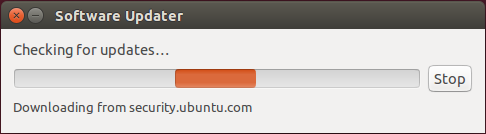
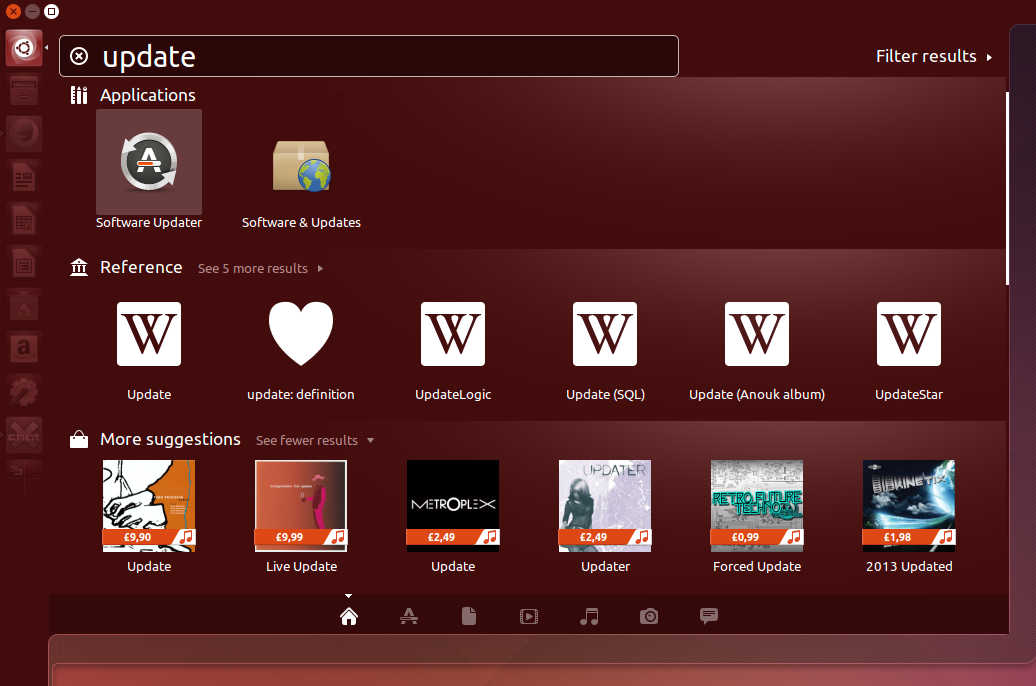
Installing updates is the first thing which one should do after installing a fresh copy of Ubuntu. Updates may include feature enhancement or security bugs. There are two methods to update Ubuntu. For first you can press “Dash Home” button on top of the Unity bar and type update, then select “Software Updater“.

Software Updater
Software Updater

Software Updater Checking for Updates

This would check for updates and give you an option to install the updates right away. But there’s no fun in that. And I on the other hand will use more traditional way to update my OS… Continue reading Ubuntu: Updating and Setting up Softwares

Ubuntu: The Stage is Set

So we have installed Ubuntu in a Virtual Environment and know that some (or a lot) of the things in Ubuntu differs from windows, like filesystem and how removable drive works. In this article I will be starting from a fresh install of Ubuntu and try to get familiar with the User Interface. In the upcoming post I will proceed to set it up with softwares and settings.
I will literally be writing this article “while” I am using my PC, so this is not just a guide but more of a walk-through. Hence, please excuse my remarks which I sometimes make to emphasize my excitement (or disappointment) when I discover something.
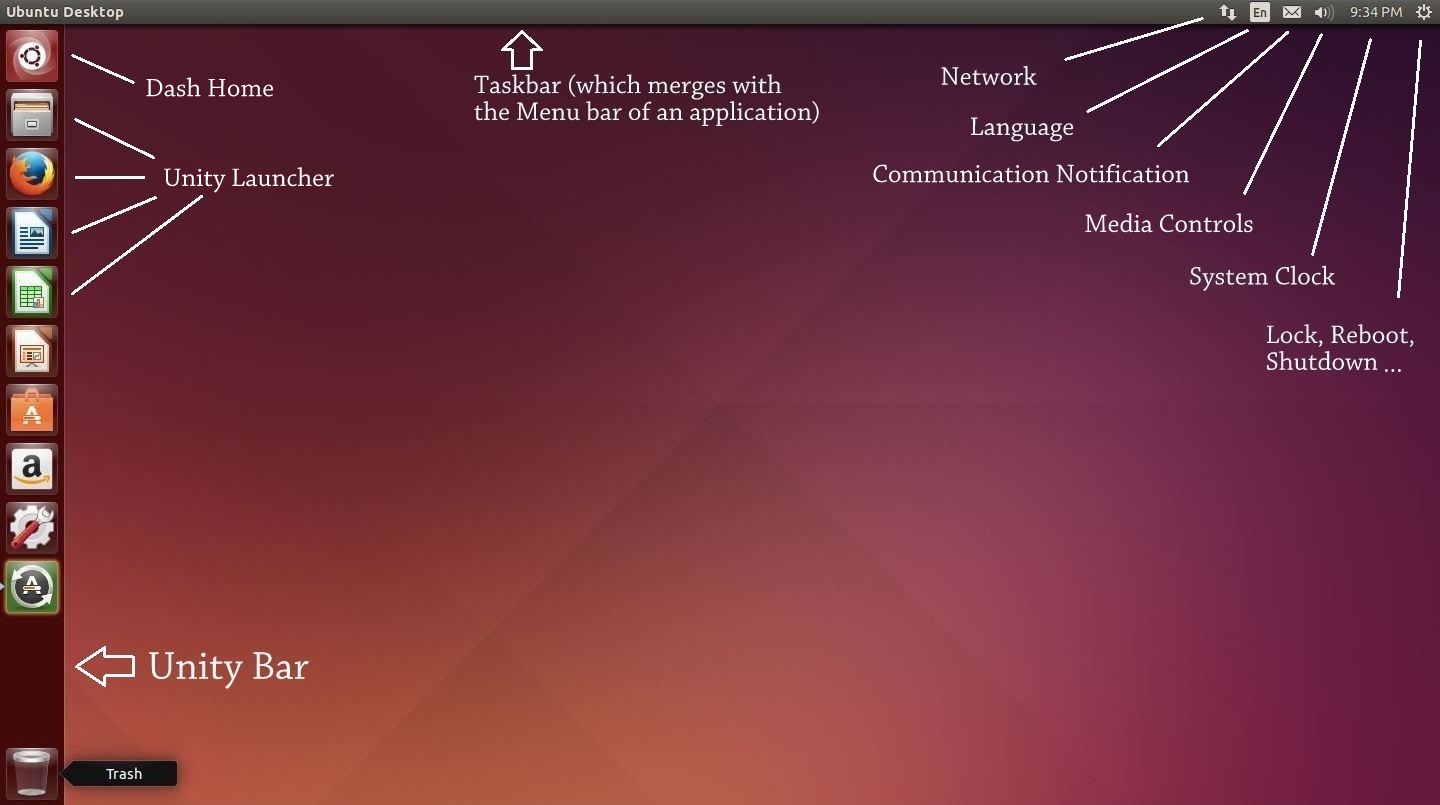
Here’s what a freshly booted Ubuntu looks like:

Freshly booted Ubuntu

We can notice a few things now:

  1. The taskbar is above the screen. It have the text “Ubuntu Desktop” written in right side of the taskbar. It also includes some icons on the top right corner including a clock and an icon on extreme right which looks like “Settings” icon.
  2. Unity bar which runs across the left side of the desktop, containing some icons of softwares like Firefox, Libre Office and System Settings. You will also notice an icon of Recycle bin down below.
  3. Rest of the screen is just plain desktop with no other stuff than default Orange wallpaper.

Now that we know about these three things, we would like to know how does these differ in functionality. Nice! Now we are getting into the good stuff …
Continue reading Ubuntu: The Stage is Set