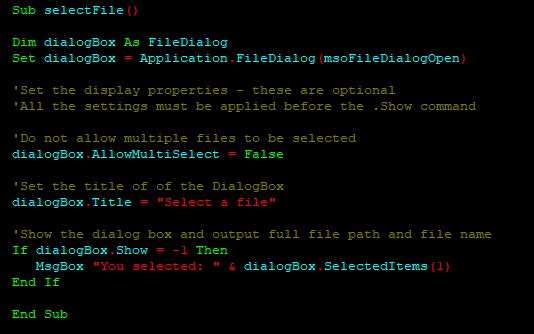
So there I was, trying to find best color combination for making my VBA editor in dark theme. While I did find an open source utility on GitHub to hack the VBE.dll and then replace it in the system, I simply wanted to know a color combination that I can quickly set in the built in VBA color palette editor so that I can make the editor dark.
So I made this guide for myself to do just that, a quick 2 min will give you dark theme!
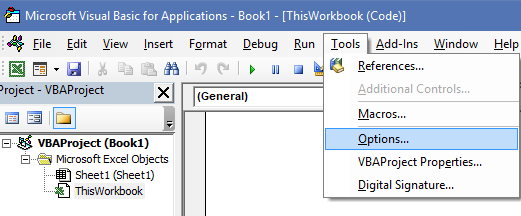
To set these, in the VBA editor, goto Tools -> Options -> Editor Format. Then refer below table to set the colors.
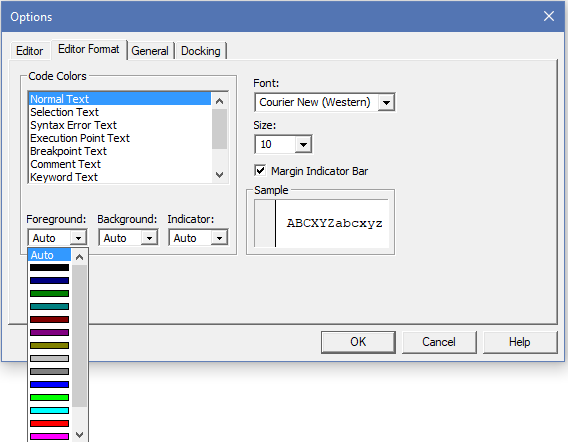
Now set the colors to below:
| Field | Foreground | Background |
| Normal Text | White | Black |
| Comment Text | Dark Grey | Black |
| Keyword Text | Light Green | Black |
| Identifier Text | Sky Blue | Black |
| Bookmark Text | Dark Green | Black |
| Call Return Text | Blue | Black |
And there, in 2 min now your VBA editor looks something like below. You can tweak it to your liking.


VBA Dark Theme - Pascal ter Heege
[…] artikel is een verlengstuk van het artikel Changing VBA editor theme. In het laatst genoemde artikel wordt uitgelegd hoe de dark theme in de Visual Basic Editor […]